
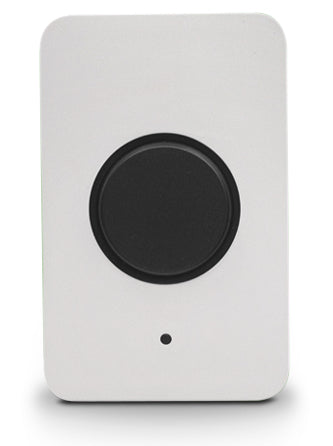
Meraki MT30-HW | MT30 Smart Automation Button, BLE, Battery-Powered
SKU:MT30-HW
Stock Status: Enquire
Need a quote or bulk pricing? Answered within 20 minutes, Sydney business hours.
Description
Description
The Meraki MT30 is a battery-powered Bluetooth Low Energy smart automation button in the Meraki MT sensor range. A press triggers custom actions built in the Meraki dashboard Automation Builder, so staff, teachers or operations teams can start a workflow without touching a screen. Typical uses include alerting staff when a customer needs assistance, turning off Wi-Fi to help students focus, replenishing material on a manufacturing line and controlling office lighting.
The button uses Bluetooth Low Energy 4.2 in the 2.400-2.4835 GHz band and supports customisable button press triggers. It runs from one AA battery for up to five years, or from a USB-C power adapter rated 5V, 0.1A. The enclosure measures 117.1 x 65.9 x 26.0 mm, weighs 102 g without the battery and is IP55 rated, with an operating temperature range of -18 to +55 C. This SKU is the hardware only. Each MT sensor needs a Meraki MT licence (LIC-MT-XY) to operate.
The MT30 connects over BLE to compatible Meraki MV smart cameras and MR access points acting as gateways. Automation actions integrate natively with MV, MR and MS, including MV snapshots, MR SSID control and MS switch port toggling. Alerts can also be sent by email, SMS, push notification or webhook.
Enquire with XS Network Tech for new or used pricing and availability.
Features
Features
Warranty
Warranty
All technical data should be verified on the manufacturer data sheets.
View full details
What is the difference between add to cart and request a quote?
Add to Cart lets you purchase in-stock products immediately at listed pricing.
Request a Quote is for customised pricing, volume-based deals, or orders that need a tailored response.
specs-tabs
Collapsible content
Technical Specifications
FAQs
Technical Specifications
FAQs
Related Products
-
 Vendor:Meraki
Meraki MT11-HW | MT11 Temperature Probe Sensor, BLE, Sensor Only
MT11-HW
Stock Status: Enquire
Vendor:MerakiThe Meraki MT11 is a cloud-managed, battery-powered Bluetooth Low Energy temperature probe sensor fr... -
 Vendor:Aruba
Aruba JX987A | Tags BLE Asset Tracking Beacon, 50-Pack, Battery
JX987A
Stock Status: Enquire
Vendor:ArubaThe Aruba Tags BLE Asset Tracking Beacon is a small Bluetooth Low Energy tag for locating valuable p... -
 Vendor:Meraki
Meraki MT20-HW | MT Cloud-Managed Door Open/Close Sensor, Bluetooth
MT20-HW
Stock Status: Enquire
Vendor:MerakiThe Meraki MT20 is a battery-powered, cloud-managed indoor open/close sensor from the Meraki MT sens... -
 Vendor:HPE
HPE P06116-B21 | MCS 300 Auto Door Controller Kit for Rack Access
P06116-B21
Stock Status: Enquire
Vendor:HPEThe MCS 300 Auto Door Controller Kit is a rack accessory designed to automate door operation for ser... -
 Vendor:Meraki
Meraki MA-PWR-ETH | USB-C Ethernet/PoE Adapter for MV2 and MT, 802.3af, 1m
MA-PWR-ETH
Stock Status: Enquire
Vendor:MerakiThe Meraki USB-C to Ethernet adapter is an optional accessory for powering a Meraki MV2 camera or MT... -
 Vendor:Meraki
Meraki MA-MNT-MV-89 | MV Parapet Mounting Bracket for MV84X Camera
MA-MNT-MV-89
Stock Status: Enquire
Vendor:MerakiThe Meraki MA-MNT-MV-89 is a parapet mounting bracket for the Meraki MV84X multi-imager camera. It i... -
 Vendor:Meraki
Meraki MA-MNT-MV-88 | MV Corner Mount, White, Hallway/Dual-Wall Camera Mount
MA-MNT-MV-88
Stock Status: Enquire
Vendor:MerakiThe Meraki MV Corner Mount is a passive mounting accessory for third-generation MV smart cameras. It... -
 Vendor:Meraki
Meraki MA-MNT-MV-79 | MV Smart Camera Corner Mount Adapter for MV84X
MA-MNT-MV-79
Stock Status: Enquire
Vendor:MerakiThe Meraki MV Corner Mount Adapter is a mounting accessory for the multi-imager Meraki MV84X smart c...


Recently Viewed
-

Request a Quote
Looking for competitive pricing? Submit a request, and our team will provide a tailored quote that fits your needs.

