
Skip to product information
1 of 1

Cisco

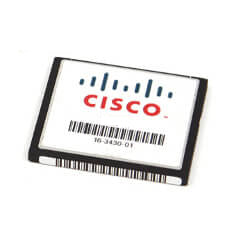
Cisco MEM-FLASH-8G | 8GB CompactFlash | CF storage module | for network devices

SKU:MEM-FLASH-8G

Stock Status: Enquire

Request Quote
Sale Sold out
Shipping calculated at checkout.
20-min response

Need a quote or bulk pricing? Answered within 20 minutes, Sydney business hours.

Description

8GB CompactFlash (CF) memory card designed for storing system images, logs, and configurations on network equipment with a CF slot. Ideal as a field-replaceable spare or capacity upgrade for routers, switches, and security appliances.

Features

- Reliable non-volatile storage for network devices
- Sufficient capacity for multiple images and logs
- Simple plug-in replacement
- Widely compatible across CF-enabled platforms
- Ideal as a spare for rapid field replacement

Warranty

All products sold by XS Network Tech include a 12-month warranty on both new and used items. Our in-house technical team thoroughly tests used hardware prior to sale to ensure enterprise-grade reliability.

All technical data should be verified on the manufacturer data sheets.

View full details
specs-tabs

Collapsible content

Technical Specifications

FAQs

Technical Specifications

- Capacity: 8 GB
- Media type: CompactFlash (CF)
- Use case: OS images, configurations, logs
- Compatibility: Network devices with CompactFlash slot
- Form: Field-replaceable removable media

FAQs

Q: Will this CF card work in my router or switch?
A: If your device has a CompactFlash slot and supports 8 GB media, it will generally work. Check your platform release notes for supported CF capacities.

Q: Can I boot the device image from this card?
A: Most platforms that support CompactFlash allow storing and booting images from CF. Verify boot media options in your device documentation.

Q: Is any special formatting required?
A: Many platforms use FAT/FAT32 for CompactFlash. Follow your device’s software guide for the correct file system and image copy procedure.

Q: Is this hot-swappable?
A: Hot-swap behavior varies by platform. For safety, follow the device’s recommended procedure and, if required, power down or unmount before removal.

Recently Viewed

  • Request a Quote

    Looking for competitive pricing? Submit a request, and our team will provide a tailored quote that fits your needs.

  • Contact Us Directly

    Have a question or need immediate assistance? Call us for expert advice and real-time support.

    Call us Now  
  • Contact Us Directly

    Have a question or need immediate assistance? Call us for expert advice and real-time support.

    Contact us