
Skip to product information
1 of 1

Cisco

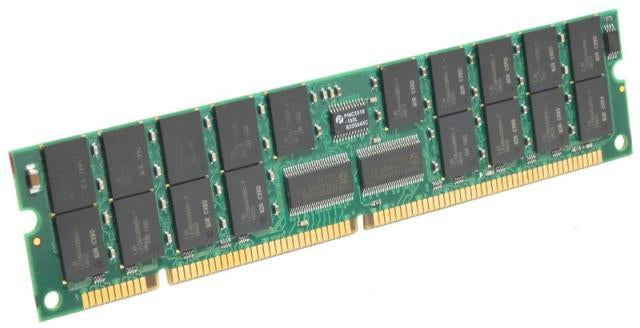
Cisco MEM-CC-WAN-256M | 6500/6700 FlexWAN DRAM upgrade | 256MB

SKU:MEM-CC-WAN-256M

Regular price POA
POA
POA
Sale Sold out
Taxes included. Shipping calculated at checkout.

Description

Increase the memory capacity of your 6500/6700 FlexWAN line card to better support complex IOS features, larger routing/ACL tables, and higher session counts. Installation requires a controlled power-down, ESD handling, and reseating the memory on the FlexWAN card, after which the system recognizes the new capacity on boot.

Features

- High-capacity DRAM upgrade tailored for 6500/6700 FlexWAN
- Supports feature-rich IOS deployments and larger table sizes
- Straightforward field installation with clear verification
- Extends platform longevity without a full hardware refresh
- Enterprise-grade reliability and compatibility

Warranty

All products sold by XS Network Tech include a 12-month warranty on both new and used items. Our in-house technical team thoroughly tests used hardware prior to sale to ensure enterprise-grade reliability.

All technical data should be verified on the manufacturer data sheets.

View full details
specs-tabs

Collapsible content

Technical Specifications

FAQs

Technical Specifications

- Capacity: 256 MB DRAM
- Intended for: 6500/6700 FlexWAN line card
- Use case: Expanded headroom for advanced IOS services and larger tables
- Installation: Field-installable (requires chassis power-down)
- Package: Single memory module
- Compatibility note: Verify FlexWAN hardware revision and IOS minimums for 256 MB

FAQs

Q: What benefits will 256 MB provide over lower capacities?
A: Greater capacity supports more complex features, larger control-plane tables, and can improve stability under heavier workloads.

Q: Can I install this without downtime?
A: No. Memory on FlexWAN line cards is not hot-swappable; schedule a maintenance window.

Q: Does this require a specific IOS image?
A: Some capacities require minimum IOS releases. Check the release notes for your hardware and software train.

Q: How can I confirm successful installation?
A: After reboot, use CLI commands such as show version or show tech to verify recognized memory.

Q: Is mixing memory types supported?
A: Use supported, matching memory for the card. Mixing types or sizes on the same card is not recommended.

  • Related products

Recently Viewed

  • Request a Quote

    Looking for competitive pricing? Submit a request, and our team will provide a tailored quote that fits your needs.

  • Contact Us Directly

    Have a question or need immediate assistance? Call us for expert advice and real-time support.

    Call us Now  
  • Contact Us Directly

    Have a question or need immediate assistance? Call us for expert advice and real-time support.

    Contact us