
Skip to product information
1 of 1

Cisco

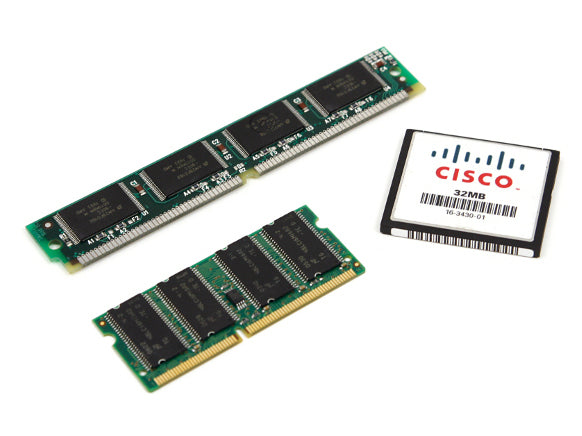
Cisco MEM-C5K-SUP2-UPGD | Supervisor Engine memory upgrade | for Catalyst 5000/5500 SUP2

SKU:MEM-C5K-SUP2-UPGD

Regular price POA
POA
POA
Sale Sold out
Taxes included. Shipping calculated at checkout.

Description

Optimize Catalyst 5000/5500 performance with a Supervisor Engine II memory upgrade. This kit increases available supervisor resources to support larger configurations, more features, and greater stability on production networks. Designed for straightforward field installation with standard ESD precautions and a brief maintenance window.

Features

- Purpose-built for Catalyst 5000/5500 SUP2
- Expands memory resources for stability and feature scalability
- Straightforward field installation
- Supports larger routing/switching tables and configurations
- Pro-grade component quality for legacy enterprise platforms

Warranty

All products sold by XS Network Tech include a 12-month warranty on both new and used items. Our in-house technical team thoroughly tests used hardware prior to sale to ensure enterprise-grade reliability.

All technical data should be verified on the manufacturer data sheets.

View full details
specs-tabs

Collapsible content

Technical Specifications

FAQs

Technical Specifications

- Platform compatibility: Catalyst 5000/5500
- Supervisor compatibility: Supervisor Engine II (SUP2)
- Function: Supervisor memory upgrade kit
- Intended outcome: Expands supervisor memory capacity for larger configs and features
- Installation: User-installable; requires maintenance window and reboot
- Best practice: Verify software release compatibility and ROM requirements before upgrade
- ESD handling: Required during installation

FAQs

Q: Is this compatible with all Catalyst 5000/5500 chassis?
A: It is designed for Catalyst 5000/5500 systems equipped with Supervisor Engine II. Verify your supervisor model before purchase.

Q: Do I need to back up my configuration?
A: Yes. Always back up configurations and schedule a maintenance window as a reboot is typically required.

Q: Will this enable new software features?
A: Additional memory can allow certain features and larger tables to run, but feature availability still depends on your software release.

Q: Can I install this while the switch is running?
A: No. Power down and follow ESD precautions and vendor procedures.

Q: How do I confirm the upgrade was successful?
A: After boot, use system commands to verify reported memory capacity and normal supervisor operation.

Recently Viewed

  • Request a Quote

    Looking for competitive pricing? Submit a request, and our team will provide a tailored quote that fits your needs.

  • Contact Us Directly

    Have a question or need immediate assistance? Call us for expert advice and real-time support.

    Call us Now  
  • Contact Us Directly

    Have a question or need immediate assistance? Call us for expert advice and real-time support.

    Contact us