
Skip to product information
1 of 1

Cisco

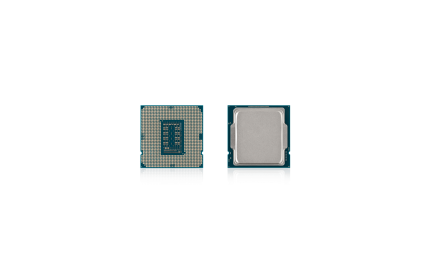
Cisco HCI-CPU-A9455 | 48C 3.15GHz, 300W TDP, 256MB L3, DDR5-6000; balanced performance

SKU:HCI-CPU-A9455

Regular price POA
POA
POA
Sale Sold out
Taxes included. Shipping calculated at checkout.

Description

48-core server processor offering a strong mix of throughput and efficiency with 256MB L3 cache and DDR5-6000 support. Ideal for dense virtualization, cloud-native services, and scale-out databases requiring high core density.

Features

- 48 cores for high VM/container density
- 256MB L3 cache for efficient query and analytics performance
- DDR5-6000 support for increased memory bandwidth
- Balanced frequency and power for general-purpose data center workloads
- Designed for scalable multi-socket server deployments

Warranty

All products sold by XS Network Tech include a 12-month warranty on both new and used items. Our in-house technical team thoroughly tests used hardware prior to sale to ensure enterprise-grade reliability.

All technical data should be verified on the manufacturer data sheets.

View full details
specs-tabs

Collapsible content

Technical Specifications

FAQs

Technical Specifications

- Cores: 48
- Clock speed: 3.15 GHz
- TDP: 300 W
- L3 Cache: 256 MB
- Memory support: DDR5 up to 6000 MT/s
- Series class: Balanced performance (non-F, non-P)
- Platform: Enterprise/server class CPU
- Use cases: Virtualization, cloud-native microservices, databases

FAQs

Q: Is this CPU appropriate for dual-socket servers?
A: Yes, this class is intended for multi-socket capable platforms; verify support with your server model and BIOS.

Q: Does it support DDR5 ECC RDIMM/LRDIMM?
A: Yes, it supports server-grade DDR5 ECC memory; maximum speed depends on DIMM type and configuration.

Q: Is a thermal solution included?
A: No, order the server vendor’s heatsink and any required airflow or carrier hardware separately.

Q: What workloads benefit most?
A: High core-count tasks such as consolidation of VMs/containers, scale-out databases, and CI/CD pipelines.

Q: How do I ensure firmware compatibility?
A: Consult the server’s CPU support matrix and apply the recommended BIOS/firmware revision.

  • Related products

Recently Viewed

  • Request a Quote

    Looking for competitive pricing? Submit a request, and our team will provide a tailored quote that fits your needs.

  • Contact Us Directly

    Have a question or need immediate assistance? Call us for expert advice and real-time support.

    Call us Now  
  • Contact Us Directly

    Have a question or need immediate assistance? Call us for expert advice and real-time support.

    Contact us