
Skip to product information
1 of 1

Cisco

Cisco C9500X-FAN-1U-F | 1U Fan Module, Back-to-Front Airflow, Hot-Swappable

SKU:C9500X-FAN-1U-F

Regular price POA
POA
POA
Sale Sold out
Taxes included. Shipping calculated at checkout.

Description

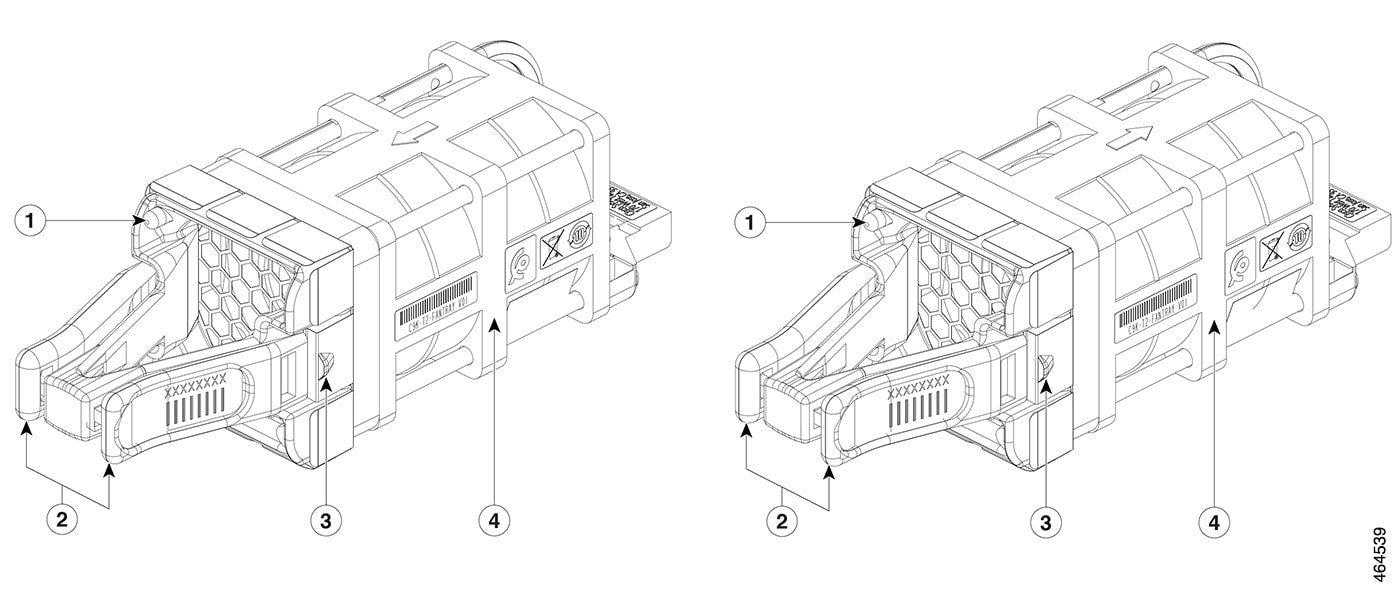
The Cisco C9500X-FAN-1U-F is a hot-swappable 1U fan module designed for Catalyst 9500X Series Switches, featuring back-to-front airflow with port-side exhaust cooling. Ideal for data center and enterprise campus environments requiring flexible airflow configurations, this field-replaceable fan module supports variable-speed operation and online insertion and removal for continuous uptime.

Features

Hot-swappable field-replaceable design for continuous operation
- Back-to-front (port-side exhaust) airflow configuration for flexible data center cooling
- Variable-speed fan control adjusts automatically based on internal switch temperature
- Supports online insertion and removal (OIR) without switch downtime
- LED indicators for real-time status and health monitoring
- Tool-less installation with simple push-release mechanism
- High-efficiency cooling supporting up to 30,000 rpm fan speed
- Designed for 1U Catalyst 9500X chassis form factor
- Supports redundant fan operation with tolerance for individual fan failure
- Compatible with both AC and DC power supply configurations on Catalyst 9500X switches

Warranty

All products sold by XS Network Tech include a 12-month warranty on both new and used items. Our in-house technical team thoroughly tests used hardware prior to sale to ensure enterprise-grade reliability.

All technical data should be verified on the manufacturer data sheets.

View full details
specs-tabs

Collapsible content

Technical Specifications

FAQs

Technical Specifications

Product Type: Hot-swappable fan module
- Form Factor: 1U rack unit
- Airflow Direction: Back-to-front (port-side exhaust)
- Compatibility: Cisco Catalyst 9500X-28C8D, C9500X-60L4D switches
- Fan Configuration: Six individual modular fan units per tray
- Maximum Fan Speed: Up to 30,000 rpm
- Weight: Approximately 0.26 lbs (0.12 kg) per fan tray
- Operating Temperature Range: -5°C to +35°C (23°F to 95°F) at sea level
- Operating Temperature at Altitude: -5°C to +30°C up to 6,000 feet (1,800 m); -5°C to +25°C up to 10,000 feet (3,000 m)
- Hot-Swap Support: Yes, supports online insertion and removal (OIR)
- LED Indicators: Status and health monitoring LEDs
- Tool-Less Design: Yes, for easy installation and removal

FAQs

Q: What is the difference between C9500X-FAN-1U-F and C9500X-FAN-1U-R?
A: The C9500X-FAN-1U-F provides back-to-front airflow with port-side exhaust, while the C9500X-FAN-1U-R provides front-to-back airflow with port-side intake. The F model is designed for deployments where exhaust air flows from the port side toward the rear of the switch (hot aisle), whereas the R model pulls cool air in from the port side.

Q: Can I mix C9500X-FAN-1U-F and C9500X-FAN-1U-R fan modules in the same switch?
A: No, all fan modules in a Catalyst 9500X switch must have the same airflow direction. Mixing fan modules with different airflow directions can cause thermal issues and improper cooling.

Q: Is the C9500X-FAN-1U-F compatible with older Catalyst 9500 models?
A: No, the C9500X-FAN-1U-F is specifically designed for Catalyst 9500X Series Switches (C9500X-28C8D and C9500X-60L4D). Older Catalyst 9500 high-performance models (C9500-24Y4C, C9500-48Y4C, C9500-32C, C9500-32QC) and standard models use different fan modules such as FAN-T4-R or C9K-T1-FANTRAY.

Q: Can the fan module be replaced without shutting down the switch?
A: Yes, the C9500X-FAN-1U-F is hot-swappable and supports online insertion and removal (OIR), allowing replacement during operation without disrupting network services. However, Cisco recommends minimizing the time the chassis operates with a missing fan to avoid thermal stress.

Q: How many fan modules are required for a Catalyst 9500X switch?
A: The Catalyst 9500X switches support up to six individual modular fan units in the rear of the switch. While the switch can operate with one fan failure, all fan slots should be populated for optimal cooling and redundancy.

Recently Viewed

  • Request a Quote

    Looking for competitive pricing? Submit a request, and our team will provide a tailored quote that fits your needs.

  • Contact Us Directly

    Have a question or need immediate assistance? Call us for expert advice and real-time support.

    Call us Now  
  • Contact Us Directly

    Have a question or need immediate assistance? Call us for expert advice and real-time support.

    Contact us